Frequently Asked Questions
Answers to common questions about participating in SurgWeek‑2.
Sign up as a collaborator Access the SurgWeek‑2 REDCapAbout the Study
What is SurgWeek‑2?
SurgWeek‑2 is an international, prospective, observational cohort study that aims to assess the global burden and variation of postoperative complications. It is open to all surgical specialties worldwide and will include consecutive patients undergoing any operation (elective or emergency) across participating hospitals.
Read more about the study in the protocol and appendices.
Read more about the study in the protocol and appendices.
What is the primary aim?
The primary aim is to determine the global variation in 30-day postoperative complications across low-, middle-, and high-income countries.
Read more about the study in the protocol and appendices.
Read more about the study in the protocol and appendices.
Eligibility
Which hospitals can participate?
Any hospital worldwide where surgery is performed is eligible to participate, provided the site secures all necessary local and national study approvals.
Which patients are included?
All patients (adults and children) undergoing any elective or emergency operation performed in an operating theatre are eligible. Both day-case and inpatient surgery are included. All surgical specialties can participate.
Are there any exclusions?
Yes. Patients who do not undergo an operation, patients undergoing angiography, and patients undergoing minor procedures (listed in the Appendices of the Protocol) are excluded. Each patient should only be included once, based on the first operation they undergo within the data capture window.
Do all surgical specialties at my hospital need to participate?
No. It is not mandatory for all specialties to participate in your hospital. You can choose which surgical specialties to participate in the study. However, we do encourage you to engage colleagues from all specialties to set up Mini-Teams in each specialty and time period if possible.
Data Collection
What data is collected?
Data is collected across several domains: demographics and presentation, emergency and diagnostic pathways, intraoperative variables, postoperative outcomes, and antimicrobial resistance. A full list of data fields and definitions can be found in the appendices of the study protocol.
When does data collection take place?
Data collection runs across nine 7-day blocks between 31 August 2026 and 1 November 2026. Each block has a corresponding 30-day follow-up period, with the final follow-up period ending 1 December 2026. The full schedule is available on the home page of the SurgWeek‑2 website.
Why was the study period extended?
We know many of our colleagues have worked extremely hard to get local approvals in place to facilitate SurgWeek‑2. Due to overwhelming demand, and some hospitals still awaiting approvals, we have decided to extend the study for three weeks to allow everyone the opportunity to participate.
The new data periods (7–9) are open to all hospitals. If your hospital wishes to participate in these new periods, you can select the periods through the Mini-Team project you have used previously.
Dates of new periods:
Period 7: 00:00, 12 October 2026 – 23:59, 18 October 2026 (30-day follow-up ends 17 November 2026)
Period 8: 00:00, 19 October 2026 – 23:59, 25 October 2026 (30-day follow-up ends 24 November 2026)
Period 9: 00:00, 26 October 2026 – 23:59, 1 November 2026 (30-day follow-up ends 1 December 2026)
The new data periods (7–9) are open to all hospitals. If your hospital wishes to participate in these new periods, you can select the periods through the Mini-Team project you have used previously.
Dates of new periods:
Period 7: 00:00, 12 October 2026 – 23:59, 18 October 2026 (30-day follow-up ends 17 November 2026)
Period 8: 00:00, 19 October 2026 – 23:59, 25 October 2026 (30-day follow-up ends 24 November 2026)
Period 9: 00:00, 26 October 2026 – 23:59, 1 November 2026 (30-day follow-up ends 1 December 2026)
How many data collection blocks do we need to participate in?
Hospitals can participate in between one and nine blocks. You can choose how many blocks to cover based on your team's capacity.
How is data collected?
Data is collected and stored through the secure REDCap web application, hosted by the University of Birmingham. Collaborators are encouraged to enter data directly into REDCap. Alternatively, data can first be recorded on a paper Case Report Form (CRF) and then uploaded to REDCap later. Paper copies must be destroyed as confidential waste once data are uploaded.
Please refer to this helpful youtube video when collecting patient data. An Arabic version is available here.
Please refer to this helpful youtube video when collecting patient data. An Arabic version is available here.
How does 30-day follow-up work?
Follow-up data should be collected from routine hospital records (medical notes, electronic health records, observation charts, drug charts, discharge letters, clinic letters, radiology and microbiology reports, etc.). No change in routine patient care or dedicated telephone or in-person follow-up is required — follow-up relies solely on existing records.
How do I identify eligible patients?
We recommend daily review of theatre logs, daily review of handover sheets, ward or assessment unit entries, and daily discussion with admitting or on-call teams to ensure consecutive patients are captured. Please coordinate your strategy with your Hospital Lead and Co-Leads.
What is the site survey?
The site survey is a questionnaire about your hospital and team. The information it gathers allows us to analyse patient outcomes in the context of each hospital. The Hospital Lead and Co-Leads will be asked to complete it once per hospital, after patient data collection has finished.
Using the Paper CRF
Can I collect data on paper?
Yes. Please find the paper CRFs on the Materials page. If collecting data on paper, you can input the data throughout the data collection and follow-up periods (including for periods that have already passed, provided you identified those patients prospectively). Please register the Mini-Teams as soon as possible. For periods that are active or have passed, Mini-Team members can expect to receive their logins within 24–48 hours of Mini-Team registration.
How do I use the paper CRF pack?
Complete Forms A, B and C for every patient entered into the study. Where applicable, add module forms (D–H). Bear in mind that a patient may need more than one (for example, a robotic abdominal operation needs both D and E). Bear in mind that the abdominal module should only be completed for those with an incision in the abdomen.
Grey shaded questions are conditional: complete them only when the "Only if" line at the top of the question is true; otherwise leave the whole question blank.
Write the patient identifier on every page before you start, as pages can become separated. Do not upload the patient identifier to REDCap — it stays on the paper forms only.
Enter the completed forms into REDCap and file the paper originals as source data.
Please find the paper CRFs on the Materials page.
Grey shaded questions are conditional: complete them only when the "Only if" line at the top of the question is true; otherwise leave the whole question blank.
Write the patient identifier on every page before you start, as pages can become separated. Do not upload the patient identifier to REDCap — it stays on the paper forms only.
Enter the completed forms into REDCap and file the paper originals as source data.
Please find the paper CRFs on the Materials page.
Which paper CRF forms do I need to complete?
Every patient needs Forms A, B and C. Add a module form (D–H or M) only if its trigger applies:
| Form | Name | Who completes it | Items |
|---|---|---|---|
| A | Demographic and pre-operative data | All patients | 30 |
| B | Intra-operative data | All patients | 18 |
| C | Post-operative data | All patients | 18 |
| D | Robotic surgery module | Only if B20 or B21 = Robotic assisted | 23 |
| E | Abdominal surgery module | Only if A11 = Abdomen and Pelvis, excluding caesarean section. The abdominal surgery module should only be completed for those with an incision in the abdomen. | 36 |
| F | Caesarean section module | Only if B19 = Caesarean section (caesarean delivery is an equivalent term) | 42 |
| G | Orthopaedic surgery module | Only if A10.5 includes a fracture or hand injury | 49 |
| H | VP shunt module | Only if B19 = insertion or revision of a ventriculoperitoneal shunt | 10 |
| M | Mortality module | Only if C28.1 = Grade V (death within 30 days) | 21 |
Colour and letter are printed on every page, so black-and-white photocopies can still be identified by the letter block.
Please find the paper CRFs on the Materials page.
What order should I complete the paper CRFs in?
Complete Form A (Demographic and pre-operative) before or at the operation, then Form B (Intra-operative) on the day of the operation. Add every module form (D–H) that applies — a patient may need more than one.
Complete Form C (Post-operative) for all patients at the 30-day follow-up. Only if the patient died within 30 days (C28.1 = Grade V) should Form M (Mortality) also be completed.
Module forms D–H contain both operative and 30-day items, so keep them with the patient pack until the 30-day follow-up is complete. Enter all completed forms into REDCap and retain the paper originals as source data.
Please find the paper CRFs on the Materials page.
Complete Form C (Post-operative) for all patients at the 30-day follow-up. Only if the patient died within 30 days (C28.1 = Grade V) should Form M (Mortality) also be completed.
Module forms D–H contain both operative and 30-day items, so keep them with the patient pack until the 30-day follow-up is complete. Enter all completed forms into REDCap and retain the paper originals as source data.
Please find the paper CRFs on the Materials page.
Roles and Responsibilities
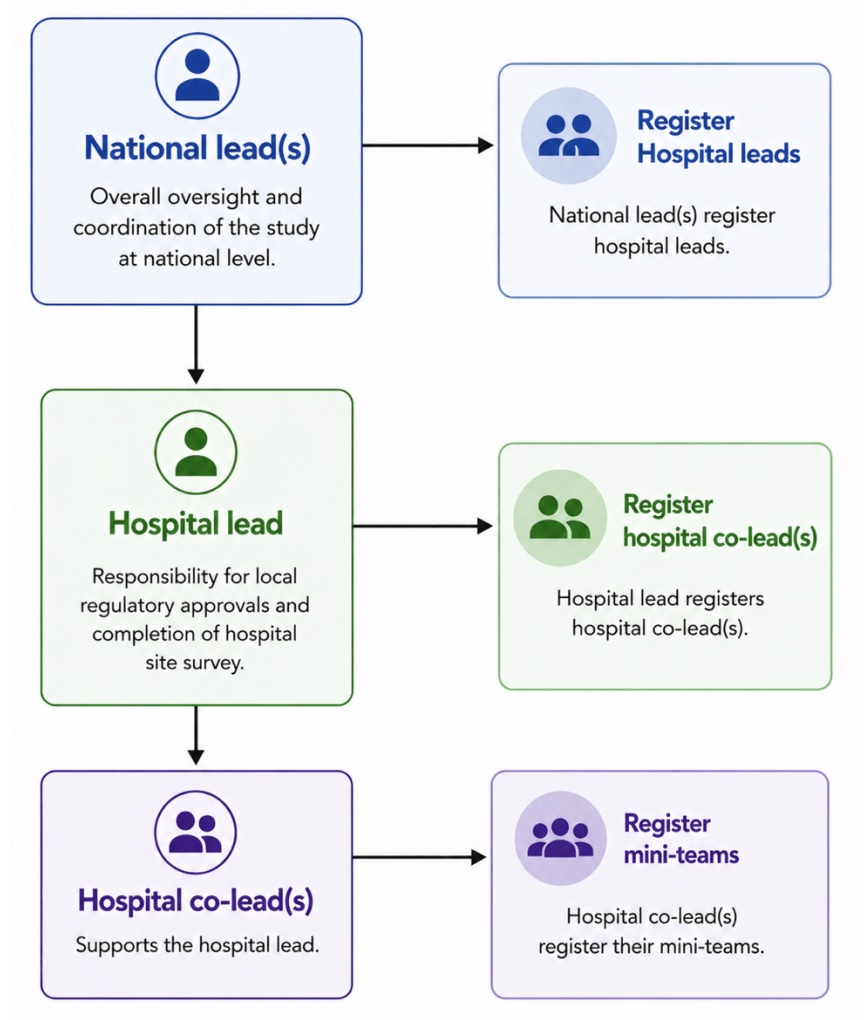
What does a National Lead do?
National Leads coordinate the study within their country. Key responsibilities include disseminating the study through national networks, recruiting hospital sites and selecting Hospital Leads, assessing whether national ethics approval is needed (and obtaining it if so), and facilitating translation of study materials where needed.
Contact your National Lead here. If you don't see your country listed, and would like to take on the responsibility of being a National Lead, please contact the central study team for more information.
Contact your National Lead here. If you don't see your country listed, and would like to take on the responsibility of being a National Lead, please contact the central study team for more information.
What does a Hospital Lead do?
The Hospital Lead coordinates the study within their site. They are responsible for securing local ethics/audit approval, selecting Co-Leads and organising Mini-Teams, completing the hospital-level site survey, ensuring data completeness, and acting as the primary point of contact at their hospital. The Hospital Lead must be a senior surgeon or anaesthetist (consultant/attending or equivalent).
You are only a Hospital Lead if you have received an email confirming you have been selected for this position.
You are only a Hospital Lead if you have received an email confirming you have been selected for this position.
What does a Co-Lead do?
Co-Leads support the Hospital Lead in coordinating data collection at the site. They will identify Mini-Team Collaborators for each time period and specialty in their hospital. There is no limit to the number of Co-Leads.
You are only a Co-Lead if you have received an email confirming you have been selected for this position.
You are only a Co-Lead if you have received an email confirming you have been selected for this position.
How do I assign a Co-Lead?
You can assign a Co-Lead or multiple Co-Leads if you are Hospital Lead. Please refer to our helpful youtube video for instructions on how to do this on REDCap.
What is a Mini-Team?
A Mini-Team is a group of up to three Collaborators who collect data for a given specialty during a given 7-day block. One Mini-Team may also choose to cover multiple specialties and/or blocks. Sites must ensure there is no overlap and that patients are not captured twice.
Can an individual be part of more than one Mini-Team?
Yes. Hospital Leads, Co-Leads, and Collaborators can all participate in multiple Mini-Teams, across multiple specialties and data collection periods, provided they are assigned by their Hospital Lead or Co-Lead. However, each individual may only participate at one hospital.
What does a Mini-Team Collaborator do?
Collaborators are responsible for day-to-day data collection within their Mini-Team, including identifying patients, recording and entering data into REDCap, and completing 30-day follow-up.
You are only a Mini-Team Collaborator if you have received an email confirming you have been selected for this position.
You are only a Mini-Team Collaborator if you have received an email confirming you have been selected for this position.
How do I assign Mini-Teams?
You can assign Mini-Teams if you are Hospital Lead or Co-Lead. Please refer to our helpful youtube video for instructions on how to do this on REDCap.
I registered as a Hospital Lead or Co-Lead in the Expression of Interest Form; however, I was not allocated this role in REDCap. Why?
National Leads select Hospital Leads. These must be senior surgeons/consultants/attendings. Hospital Leads select Co-Leads. Hospital Leads and Co-Leads assign Collaborators to Mini-Teams. Logins are only issued once a role has been assigned.
Approvals and Ethics
Who is responsible for obtaining study approvals?
Hospital Leads at each participating site are responsible for ensuring all necessary local and national approvals are in place before data collection begins. National Leads can advise on country-specific requirements.
How should the study be registered in the UK?
In the UK, SurgWeek‑2 must be registered as a clinical audit or service evaluation — NOT as research. The study is registered as a clinical audit at the lead centre, University Hospitals Birmingham NHS Foundation Trust; the certificate for this can be found on the Materials page. When registering locally, emphasise that all data collected measures current practice, there are no changes to patient pathways or treatment, no additional tests or follow-up are required, and only anonymised data is uploaded to the database.
How should the study be registered outside the UK?
Where possible, register the study as an audit or service evaluation. If your hospital participated in SurgWeek‑1 in 2020, consider whether an amendment to that approval could cover this study — a letter to support this can be found on the SurgWeek‑2 website. If research ethics review is required, consider requesting a waiver for patient consent on the basis that the study is purely observational with no changes to patient care and only anonymised data collected.
Do patients need to consent?
Patients should only be consented if this is required by a local or national research ethics committee. If consent is not required locally, it does not need to be sought.
Do we need a data sharing agreement?
Some hospitals may require a data sharing agreement (DSA). If needed, Hospital Leads should request a template DSA from the steering committee. Please note that DSA terms cannot be individually negotiated due to the volume required globally.
Where do I upload the ethical approval?
We ask you to confirm that all ethical approvals are in place before uploading data to REDCap. A separate REDCap project will become available for uploading digital copies of ethical approvals towards the final phase of the data collection period.
REDCap and Data Governance
What is REDCap?
REDCap (Research Electronic Data Capture) is a secure, web-based application for data collection and storage. It has been used successfully in previous large-scale collaborative studies including CovidSurg and GlobalSurg. The REDCap server for SurgWeek‑2 is managed by the University of Birmingham, UK.
How do I access REDCap?
Provided you have been assigned a role (Hospital Lead, Co-Lead, Collaborator), you will receive a unique username ending in '.sw' or '.sw2', sent by the study team. Please save your log-in details. If you have forgotten your password, please use the "Forgot my Password" option. If you cannot find your username, contact the central study team.
Hospital Leads and Co-Leads can expect their logins 24–48 hours after their registration by a national or Hospital Lead, respectively. For periods that are active or have passed, Mini-Team members can expect to receive their logins within 24–48 hours of Mini-Team registration by a Hospital Lead or Co-Lead.
Before contacting the study team, please confirm with your Hospital Lead or National Lead whether you have been assigned a role in REDCap. To assist you in determining who best to contact about your login, please check this helpful flowchart.
Hospital Leads and Co-Leads can expect their logins 24–48 hours after their registration by a national or Hospital Lead, respectively. For periods that are active or have passed, Mini-Team members can expect to receive their logins within 24–48 hours of Mini-Team registration by a Hospital Lead or Co-Lead.
Before contacting the study team, please confirm with your Hospital Lead or National Lead whether you have been assigned a role in REDCap. To assist you in determining who best to contact about your login, please check this helpful flowchart.
I haven't received a log-in, or I'm having trouble with the one I have — what should I do?
- Please check your junk / spam folders regularly for emails from REDCap.
- If you have a log-in, but have forgotten your password, use the REDCap password reset.
- If you have a log-in, but have forgotten your username, email the central study team.
- If you have a log-in, but are unsure what to do next, watch our video tutorials on Co-Lead selection, Mini-Team registration, and collecting patient data.
- If you haven't received a log-in and are a Collaborator or Co-Lead, confirm with your Hospital Lead that you've been selected on REDCap.
- If you haven't received a log-in and are a Hospital Lead, confirm with your National Lead that you've been selected.
- If you've confirmed your selection, but still haven't received your login after 72h, email the central study team.
- If you're still waiting for your log-in, you can collect data in paper format in the meantime.
For the full step-by-step pathway, see our log-in troubleshooting flowchart.
Where can I find instructions on using REDCap, from assigning roles to inputting data?
We have created short video tutorials covering the full range of REDCap tasks, from role assignment through to data entry. Please follow the links below, which can also be found on the Materials page.
- Instructions: Collecting Patient Data
- Instructions: Collecting Patient Data (Arabic)
- Instructions: Assigning Mini-Teams
- For Hospital Leads — Instructions: Selecting Co-Leads in REDCap
- For Hospital Leads — Instructions: Selecting Co-Leads, Step-by-Step Guide
- For National Leads — Instructions: Selecting Hospital Leads in REDCap
- For National Leads — Instructions: Selecting Hospital Leads, Step-by-Step Guide
Why does it take 24–72h for registration and role allocations to take effect in REDCap?
Registration and role allocation are largely automated, which lets us track affiliations and roles precisely — improving data quality and reducing errors in long authorship lists. This process runs once or twice daily on workdays, and can take longer when new hospitals need to be matched against the existing list to avoid duplicates. To speed things up, please complete the Expression-of-Interest (EOI) form as fully as possible, selecting your hospital from the existing list and using its full name.
Is patient data kept anonymous?
Yes. No patient-identifiable data is collected on REDCap. All data uploaded to the database is anonymised. Collaborators should maintain a local, secure record linking REDCap record IDs to hospital patient identification numbers (to enable follow-up data entry), but this information must not leave the site. All paper data collection sheets should be destroyed as confidential waste once data are uploaded.
Who can see the patient data?
Collaborators can only see data collected at the institutions they are assigned to. A "Mini-Team Report" is available in the left-hand column of the REDCap data collection project, summarising all records at your hospital — you can order these by Mini-Team for an easier overview.
This report is populated from the hospital name and Mini-Team name fields on each CRF, so please check the hospital name is correct and select your Mini-Team when entering data. Records already started in REDCap can be updated the next time you log in. If your records are linked to the wrong hospital, please email the central study team. Only the central study team has access to the full dataset. For further details on the data management strategy, please refer to the Appendices.
This report is populated from the hospital name and Mini-Team name fields on each CRF, so please check the hospital name is correct and select your Mini-Team when entering data. Records already started in REDCap can be updated the next time you log in. If your records are linked to the wrong hospital, please email the central study team. Only the central study team has access to the full dataset. For further details on the data management strategy, please refer to the Appendices.
I have made a mistake on a patient record. Can I delete it?
No. You are not able to delete patient records. However, the CRF includes a question that asks you to confirm if this patient should be included or excluded on the basis of an error.
Authorship and Recognition
Will I be named as an author?
All National Leads, Hospital Lead and Co-Leads will be named PubMed-citable co-authors in all resulting scientific publications from this study. All Collaborators in Mini-Teams that contribute data to the project will be named PubMed-citable co-authors in all resulting scientific publications from this study.
What happens if my site has incomplete data?
If a significant proportion of patients at your site have missing data, the site may not be included in the SurgWeek‑2 dataset and all Collaborators' names may be withdrawn from the author list. It is essential that Mini-Teams ensure data completeness, including the 30-day follow-up.
Do I need an ORCID iD?
Yes. All Collaborators should register for a free ORCID iD at orcid.org/register (if they do not already have one) and provide this to their Hospital Lead. Your ORCID iD is a unique digital identifier that ensures you are correctly credited regardless of name changes or institutional moves.
My hospital name is incorrect. How can this be corrected?
As part of the site survey, we will ask the Hospital Lead and Co-Leads to confirm the correct name of their hospital before any results are published.
My details are incorrect in REDCap. How do I correct them?
If your email address is incorrect, please contact the central study team. If your first name, last name or ORCID iD is incorrect but you are still able to continue working in REDCap, no action is needed for now. We will confirm all of these details before the author list is finalised.
Getting Involved
How do I sign up?
Complete the Expression-of-Interest (EOI) form on REDCap to register your interest in participating; your Hospital Lead and Co-Leads will coordinate role assignments from there.
If you would like to register as a Hospital Lead, please first check whether your hospital is already listed on the Hospital Leads page. If a Hospital Lead is already registered for your hospital, please still sign up via the Expression-of-Interest (EOI) form, and get in touch with them directly.
If you would like to register as a Hospital Lead, please first check whether your hospital is already listed on the Hospital Leads page. If a Hospital Lead is already registered for your hospital, please still sign up via the Expression-of-Interest (EOI) form, and get in touch with them directly.
What is the deadline for new hospitals to register?
The end of Period 4 (27 September 2026) will be the deadline for new hospitals to register. Please ask all colleagues who wish to participate to express their interest in the study through the following form before this date.
Can medical students participate?
Yes. Any member of hospital staff or student can participate as part of a Mini-Team. Please sign up via the Expression-of-Interest (EOI) form. Please reach out to your Hospital Lead to discuss how best to contribute. We kindly ask you to remember that Hospital Leads must be senior surgeons (attending/consultant).
Can I change my hospital affiliation?
Before you have collected any data for your institution, it is still possible to change institution / affiliation. Please bear in mind that each Collaborator can only participate at one hospital. Please contact the central study team. Please provide your full name, login, old and new affiliation when contacting the study team.
I signed up, but have received no information since. Why?
We send regular emails to all Collaborators, so please check your junk/spam folder first. If you're still not receiving anything from us, please reach out to the central study team and we'll check that you registered correctly.
Contact and Support
Who should I contact with questions?
For country-specific queries, e.g. concerns about necessary local regulations, please contact your National Leads. We ask all Collaborators to reach out to their Hospital Leads with their questions, before addressing these to the central study team.
Where can I find study materials?
All downloadable resources, including the study protocol, information packs, consent forms, and dissemination materials are available on the Materials page of the SurgWeek‑2 website.
Where can I stay updated on the study?
We send regular emails to all Collaborators, so please check your junk/spam folder if you're not receiving them. If you're still not receiving anything from us, please reach out to the central study team and we'll check that you registered correctly.
You can also follow us on LinkedIn and Instagram, or join our WhatsApp Community.
You can also follow us on LinkedIn and Instagram, or join our WhatsApp Community.
This FAQ is a living document and will be updated as the study progresses. If your question is not answered here, please consult the study protocol or contact the central study team.